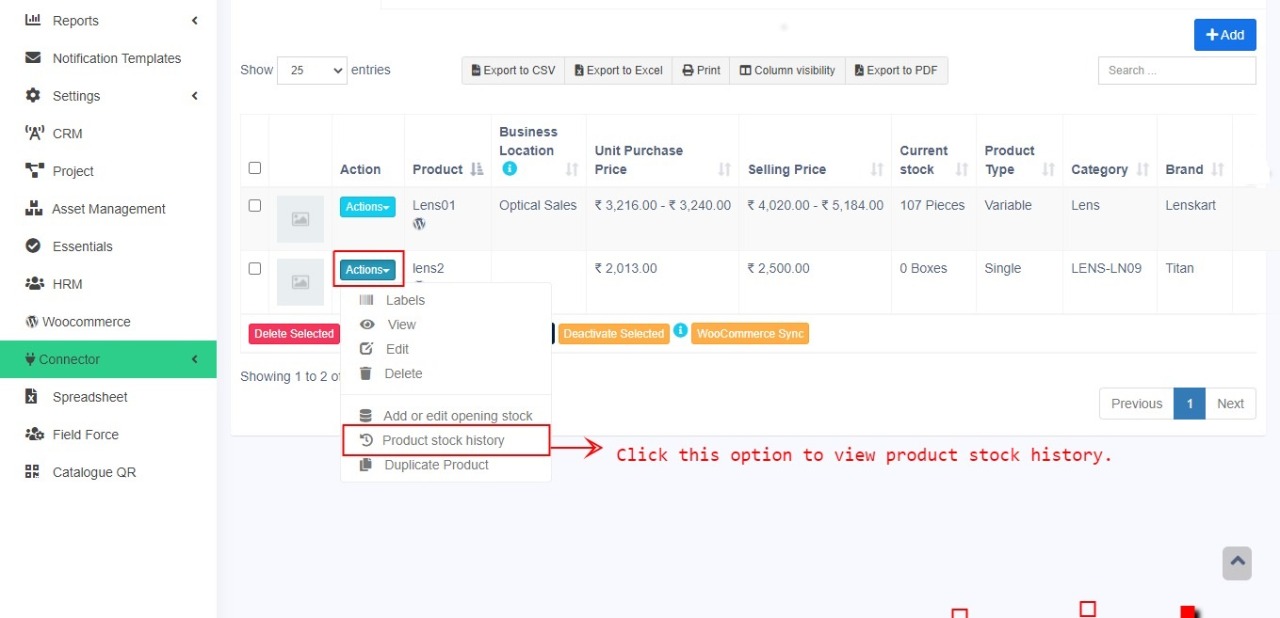
Product stock history

  1. The Product Stock History feature allows you to view detailed records of all stock-related transactions for a specific product, including:

    • Sales

    • Purchases

    • Opening Stock

    • Transferred Stock

    • Stock Adjustments

    You can also filter the history by date range to analyze stock movement over a specific period.

How to View Product Stock History

  1. Go to Products → Product List

  2. Click on the Actions dropdown for the desired product

  3. Select Product Stock History


This helps in tracking product-level inventory changes and resolving stock-related discrepancies efficiently.

Did you find this article useful?

  • Products Management

    Adding Products To add a new product to the system, follow the steps below: Step 1: Navigate to Add ...
  • Import/Export Products

    Import Products: Steps: Go to Products -> Import Products Download the template file. Fill all t...
  • Delete Product (Bulk delete)

    Deleting Products Deleting of a product will remove the products from the database. NOTE: This...
  • Variations

    Variations can be added from the Products -> Variations menu. These variations are us...
  • Product Units

    Different Products have different units. Our software allows you to add different units for products...