Custom Labels for Products

Custom Labels for Products:

Custom fields can be added for the product, these custom fields can be used while adding a new product.

Custom fields can be anything related to the product like brand code, product code etc.

To add this Go to Settings > Business Settings > Custom labels

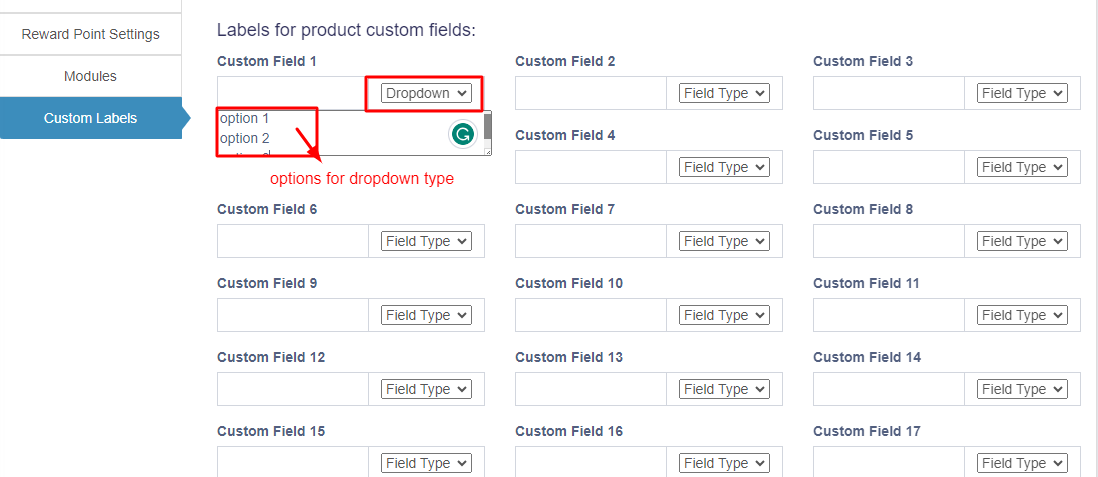
Provide the custom label name here.

Field Type for labels:

The data type can be specified for each custom field. Select text, date picker or dropdown types.

For dropdown add a line break after each option.
Did you find this article useful?

  • Products Management

    Adding Products To add a new product to the system, follow the steps below: Step 1: Navigate to Add ...
  • Import/Export Products

    Import Products: Steps: Go to Products -> Import Products Download the template file. Fill all t...
  • Delete Product (Bulk delete)

    Deleting Products Deleting of a product will remove the products from the database. NOTE: This...
  • Variations

    Variations can be added from the Products -> Variations menu. These variations are us...
  • Product Units

    Different Products have different units. Our software allows you to add different units for products...